
Fleetwise Live Status Page
https://fleetwise.statuspage.io/
Fleetwise systems cannot be accessed
If your Fleetwise systems cannot be accessed, follow the below trouble shooting steps:
-
Check the Fleetwise Status Page
Visit the [Fleetwise Status Page] to see if there’s an outage.- If there is an outage, please wait until the issue is resolved.
- You can subscribe to notifications or check the page regularly for updates.
-
Try a Different Device
Open Fleetwise on another device.- If it works there, the issue may be with your original device.
-
Check Your Internet Connection
Open a different website to confirm your internet is working.- If other sites load but Fleetwise does not, please contact the Fleetwise Support Team.
-
Verify Your Browser
Make sure you’re using a supported browser.- See the minimum system requirement for details.
Having issue logging in
The username or password is incorrect
This means you have entered either an incorrect username, or/and incorrect password. Please check you have the correct URL in the address field on your browser, and click on the Forgot Your Password link on the login page to reset your password. If you forgot your username, you can click on the Email your support team link to seek help from your fleet administrator.
Having issue sign in with Microsoft
- Error "Account does not exist in tenant"
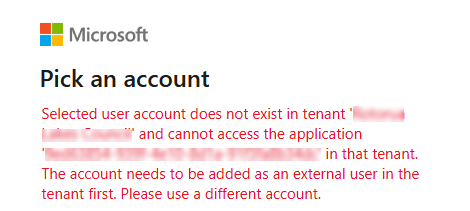
The Microsoft account you’re logged in with isn’t part of the Microsoft Entra ID group linked to Fleetwise. Please make sure you’re using your work account. If you’ve confirmed this and still can’t access Fleetwise, contact your IT team for assistance.
- Error "Can not find active account"
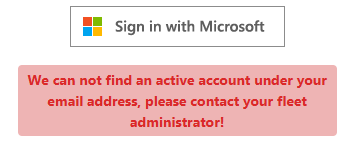
You don’t have an active profile in Fleetwise, or your profile has been disabled. Please contact your fleet administrator (the person who manages Fleetwise for your organisation) to create a new profile or update your user status.
You are booted to the login page after login with your username and password
This is normally an indication that there are some compatibility issue with your browser. Note PVBS no longer supports Internet Explorer. See minimum system requirement for more details.
Unusual display of webpages after login
If you find the webpage looks distorted after you have logged in or some of the options missing, it might have caused by cache stored on your local browser. You can clear the cache of your browser follow below steps: